Built for clients.Structured for AI.
HoldThat Client Hubs are branded portals for service businesses — onboarding, files, updates, scheduling, messaging, and payments in one place instead of six. Every Hub is built with AI Visibility best practices so ChatGPT, Claude, Gemini, Perplexity, and Google AI can understand and surface your business.
The problem
A great service can still feel disorganized to the client.
When onboarding, files, updates, and next steps are split across inboxes and tools, clients have to chase the experience you meant to deliver.
The solution
Make the relationship feel as organized as the work.
A Client Hub gives every client one branded place to begin, find what they need, see progress, and understand what happens next.
- One home for the client journey
- Progress and next steps made visible
- Your brand—not a patchwork of tools
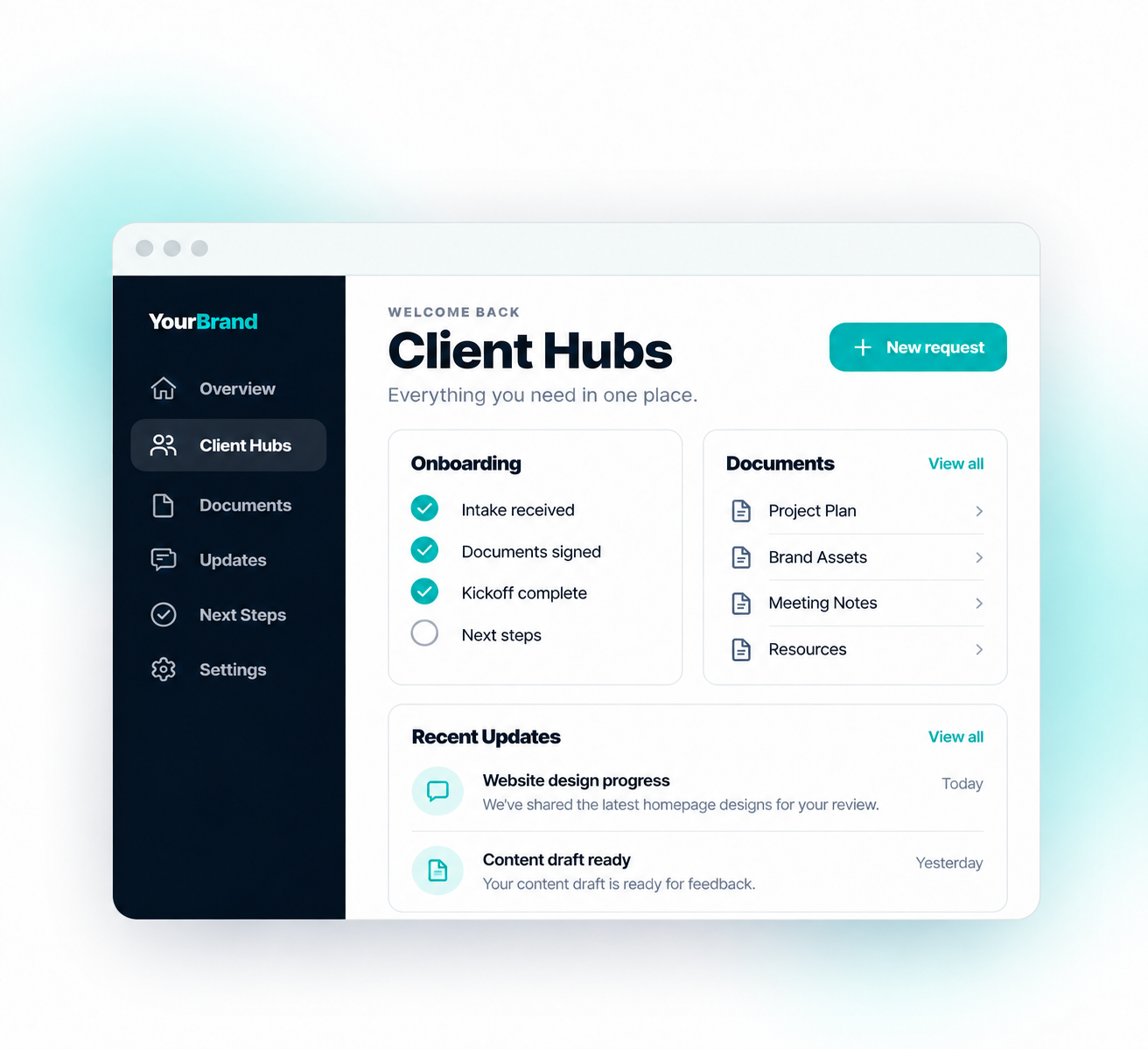
A Client Hub is the organized client-facing layer of your business. Instead of sending people through scattered email threads, cloud folders, forms, calendars, and text messages, you give them one branded destination that shows what they need, what happens next, and where to take action.
From scattered to structured.
- Files lost in long email threads
- “Where did you send that link again?”
- Status updates over text at 9pm
- Six tools and zero source of truth
- One branded hub for every client
- Clear next step, every visit
- Hours back in your week
- Clients who feel taken care of
Six layers, one branded destination.
Every Hub is designed around the moments that matter — from first impression to repeat engagement.
Onboarding
Welcome steps, forms, checklists, and intake in one place.
Files & documents
Uploads, signed documents, shared resources, and reference material without inbox digging.
Updates & timelines
Status, milestones, next steps, and client-facing visibility without “just checking in” messages.
Scheduling & payments
Booking links, invoices, contract actions, and next-step calls where clients can actually find them.
Messaging & referrals
One clean place for structured communication and referral prompts after the work is delivered.
AI Visibility foundation
Content architecture, schema, and structured pages built so ChatGPT, Claude, Gemini, Perplexity, and Google AI can understand and cite your business — not just people.
Branded & private
Your colors, your logo, your domain. Clients log in to your world — not someone else's dashboard.
A clear path from chaos to calm.
Blueprint
Answer six quick questions to identify your biggest workflow gaps, receive your personalized Client Hub Blueprint, and continue building from there.
Build
We review your Blueprint and build a branded Client Hub tailored to your business, workflow, content, and goals.
Launch
Your Client Hub goes live, fully tested, polished, and ready for your clients to use.
Client Hubs are built for agencies, consultants, service firms, advisors, and premium operators who want a cleaner client experience and less operational sprawl behind the scenes.
Your hub isn't just designed for people. It's structured for AI.
Traditional websites are built for search engines. Every HoldThat Client Hub is also built with AI Visibility best practices, including Generative Engine Optimization (GEO), so ChatGPT, Claude, Gemini, Perplexity, Copilot, and Google AI can understand your business more clearly and surface it when people ask relevant questions.
- Clear content architecture
- Structured service pages
- Internal linking
- AI-friendly navigation
- FAQ organization
- Branded resource pages
- Location & business context
- Generative Engine Optimization (GEO)
- Foundation built for long-term AI discoverability
AI Visibility isn't a bolt-on. It's baked into the Foundation every HoldThat Client Hub is built on.
One branded destination. Not six scattered links.
Most businesses send people to five or six different places. Your Client Hub brings everything together into one branded destination — easier for clients to find what they need, and easier for AI to understand what your business actually offers.
Not a website. Not a CRM. Not a shared drive.
Your website helps people find you. Your Client Hub helps clients work with you.
Your CRM manages relationships internally. Your Hub is the branded surface your client sees.
A shared drive stores files. A Client Hub organizes the relationship.
What people ask first.
What is AI Visibility?
AI Visibility is how easily AI platforms like ChatGPT, Claude, Gemini, Perplexity, Copilot, and Google AI can understand your business and surface it when someone asks a relevant question. Every HoldThat Client Hub is built with AI Visibility best practices baked in.
How is AI Visibility different from SEO?
SEO helps traditional search engines rank your pages in a list of blue links. AI Visibility uses Generative Engine Optimization (GEO) — structured content, schema, and clear architecture — so AI assistants can actually read, understand, and cite your business inside a generated answer.
Does this replace my CRM or project tool?
Not necessarily. Hubs sit on the client-facing side. We integrate with the tools you already use behind the scenes.
How long does it take to launch?
Most Hubs go live in 2–4 weeks depending on scope, content readiness, and integrations.
Is it really branded to me?
Yes. Your colors, your typography, your logo, and your domain. Clients never see another company's name.
What if my clients aren't technical?
Hubs are designed for clarity. Most clients log in once and immediately know where to go.
One calm place for every client.
Tell us how clients work with you today. We'll map the right Client Hub for your business.
Live builds you can click through.
A working demo concept — Haven Hub Realty. Click a tab to switch industries, then click inside the window to explore.
Find the right Hub for your business.
Six quick questions. Get your Hub Readiness Score, receive a personalized Client Hub Blueprint, then continue building your Client Hub.
Quick intro — takes 5 seconds.
Unlocks after your Blueprint.
Answer six quick questions above and we'll open the live Hub Builder so you can design yours.
Map My Client System ↑